Project guide
Kairos - The Job Search Agent
Kairos is a local job search dashboard. You upload your resume, choose the kind of role you want, fetch open jobs, and ask an LLM to score how well each job matches your resume. It is meant to help you sort opportunities faster, not apply automatically on your behalf.
What It Does
Kairos helps you look through job listings with your resume in mind. You choose a job title, such as Analytics Engineer, and the app pulls recent jobs from a job-search data provider.
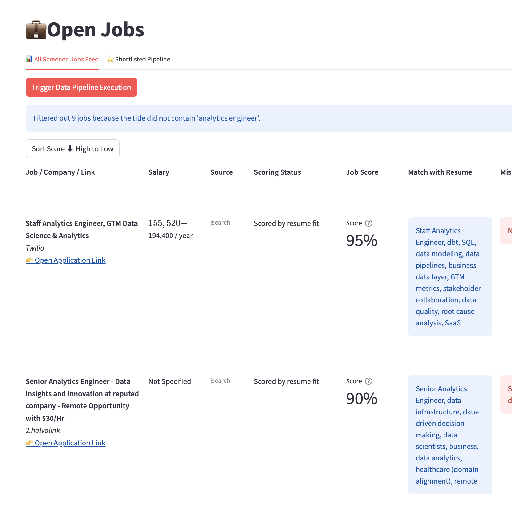
After you upload your resume, Kairos asks OpenAI or OpenRouter to compare each job description with your resume. It then shows a job score, the strongest matches, and any important gaps to pay attention to.
Your resume and API keys stay on your computer. The public project does not include my keys, and anyone using it needs to add their own.
Before You Start
You need three things:
- A computer with Python installed.
- A job data API key, such as JSearch or TheirStack.
- An LLM API key for scoring, such as OpenAI or OpenRouter.
If you only want to inspect the project, open the GitHub page and read the files. If you want the dashboard to actually fetch jobs and score them, you must add your own keys.
How To Run It
1. Download The Project
Click Download ZIP above. When the file finishes downloading, unzip it and open the folder.
2. Open Terminal In That Folder
On a Mac, right-click the folder, choose Services, then choose New Terminal at Folder. If you do not see that option, open Terminal and drag the folder into the Terminal window after typing cd .
3. Install What The App Needs
Copy this line into Terminal and press Enter:
pip install -r requirements.txt
4. Create Your Private Settings File
The project includes a safe example file called example.env. Make your own private copy called .env:
cp example.env .env
Open .env in a text editor and paste in your own API keys. Do not share this file and do not upload it to GitHub.
5. Start The Dashboard
Run this command:
streamlit run app.py
Streamlit will print a local web address. Open that address in your browser. It usually looks like http://localhost:8501.
How To Use The Dashboard
- Upload your resume once. The app keeps a local parsed copy so you do not have to upload it every time.
- Set the job title you want to search for.
- Choose how recent the jobs should be, such as the last 3 days.
- Click the button to run the pipeline.
- Review the job score, matching skills, missing items, and application link.
- Save the roles you want to revisit in the shortlist pipeline.
Common Problems
No jobs appear: check that your job provider key is present in .env, and try a broader job title.
The app says a provider limit was hit: lower the number of pages. Some free plans only allow a small number of results per page.
Scores do not appear: check that your OpenAI or OpenRouter key is present and that you selected the same scoring provider in the sidebar.
You changed the resume but still see old scoring: use Clear saved resume, upload the new resume, then run the pipeline again.